

Modeling of the Vibrations of Acetylene Using Spartan
William F. Pfeifferwpfeiffer@utica.ucsu.edu
Utica College of Syracuse University
1600 Burrstone Road
Utica, NY 13502-4892
(315)-792-3071
An alternate set of instructions is available for those using CAChe.
In the physical chemistry laboratory it is common for students to measure and analyze the gas phase IR spectrum of HCl and DCl. Less common is the measurement and analysis of the spectra of more complicated molecules like NH3 or C2H2, but these experiments are beginning to appear in standard laboratory texts[1] and Raman spectroscopy is becoming more available as well. This exercise describes the modeling of the vibrations of molecules (with acetylene as the example) using a standard molecular modeling package such as MacSpartan+. (A separate page gives instructions for using CAChe.) The exercise may be done independently or in conjunction with the experimental determination of the gas phase IR and/or Raman spectra of one or more of the molecules.
Drawing the Molecule
If you are not familiar with the drawing program you are using, ask your instructor for assistance. These directions describe one way to construct C2H2 in MacSpartan Plus.
- Open the MacSpartan Plus program.
- Select New from the File menu.
- On the Introductory Model Kit template, at the right of the screen, locate the C with a triple bond symbol and click on it.
- Click once in the workspace to place one sp-hybridized C atom and then click carefully (again once) at one bond terminus of that atom to bond a second sp-hybridized C to it.
- Move back to the symbol template, click on H and then place one H at each of the two remaining open bonds on the carbons by clicking once on each of them.
- At this point it's a good idea to click on Minimize on the template, note the point group of the molecule, and click on OK. Then move the mouse pointer into the workspace, hold the button down, and move the pointer around in the workspace. Notice how the molecule is rotated and you can check to be sure that multiple bonds, side groups, etc. are placed correctly.
- Click on Exit Builder in the File menu and save your model in an appropriately named file.
NOTE FOR ISOTOPIC SUBSTITUTION;
Isotopic substitution should be done now. Open your file in the main MacSpartan window and select Isotopes in the Build menu. Click on the atom(s) in your structure which you wish to change and stop when the appropriate mass number is displayed next to the atomic position in the model. Save the file and proceed .
Optimizing the Geometry
- Click on Calculation in the Setup menu and set up the system for geometry optimization by setting the pop-up chart as follows:
- Click on Submit in the Setup menu in order to start the calculation and click on OK in each of the two pop-up boxes that appear to tell you about the progress of the calculation. MacSpartan+ will automatically store the optimized geometry in the file for this molecule.
Calculating Vibrational Frequencies
- Choose Calculation from the Setup menu.
- A dialog box will pop up. Change the settings to match the figure below:
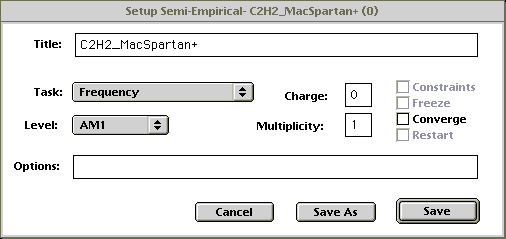
Figure 2Click on Save.
- Choose Submit from the Setup menu to begin the calculations and click on OK twice as the progress boxes pop up.
- When the calculations are completed, select Vibrations from the Display menu.
- The window which pops up will list the normal modes of vibration for the molecule (acetylene in this example). How many should there be? Which (if any) of these modes should be IR active? Which ones should be Raman active?
- Your answers to the questions in #5 may be assisted by double clicking on the modes in the list (one at a time) and studying the resulting animation of the mode which will be displayed in the main workspace. If you close the list box you will notice that holding the mouse button down will "freeze" the vibration in an intermediate configuration. This may help you understand the motion more clearly. You can also rotate the molecule by holding the mouse button down and moving the pointer about the window as done earlier after building the model. Try to name the vibration type (e.g. symmetric stretch) for each of the modes. You may retrieve the list of modes by repeating step 4 above at any time.
- If experimental equipment is available, run the gas phase IR and Raman spectra of C2H2 and compare the fundamental vibrations you have calculated with the absorptions in the experimental spectra. Be sure that you realize that the experimental spectra will be enriched with rotational structure which this modeling method has not addressed.
References
- Shoemaker, D. P.; Garland, C. W.; Nibler, J. W., Experiments in Physical Chemistry, 6th edition, McGraw-Hill